Friday, 22 February 2013

Handling Apostrophe and Ampersand in a URL using XSLT

My relationship with XSL (and XSL stylesheets / XSLT) could easily be described as turbulent... I think most other peoples could as well! Frequently I feel like smashing my monitor, throwing my keyword, kicking something, swearing, gnarling, and sometimes frothing at the mouth.

Recently I needed to format some data returned by the SharePoint's LVWP (List View Webpart), that included formatting some text into an argument used in a link. The text could contain apostrophes and ampersands, so I needed to replace the ' (for apostrophe) and & (for ampersand) with the their Hex equivalents, %27 and %26

[Side note] I needed to do this because the link I was creating was to another SharePoint page that had a URL filter webpart on it, which wouldn't handle the HTML codes for apostrophe and ampersand, but was happy with the Hex codes.

To do this, I pulled my hair out for a few hours, then used the following template;

<xsl:template name="formatUrl">
 <xsl:param name="text" />
 <xsl:variable name="apos">&amp;#39;</xsl:variable>
 <xsl:variable name="amp">&amp;amp;</xsl:variable>
 <xsl:variable name="Hapos">%27</xsl:variable>
 <xsl:variable name="Hamp">%26</xsl:variable>
 <xsl:choose>
  <xsl:when test="contains($text, $apos)">
   <xsl:variable name="fronttext" select="substring-before($text,$apos)">
   </xsl:variable>
   <xsl:variable name="endtext" select="substring-after($text,$apos)">
   </xsl:variable>       
   <xsl:call-template name="formatUrl">
    <xsl:with-param name="text" select="$fronttext" />
   </xsl:call-template>       
   <xsl:value-of select="$Hapos" />       
   <xsl:call-template name="formatUrl">
    <xsl:with-param name="text" select="$endtext" />
   </xsl:call-template>
  </xsl:when>
   <xsl:when test="contains($text, $amp)">
   <xsl:variable name="fronttext" select="substring-before($text,$amp)">
   </xsl:variable>
   <xsl:variable name="endtext" select="substring-after($text,$amp)">
   </xsl:variable>       
   <xsl:call-template name="formatUrl">
    <xsl:with-param name="text" select="$fronttext" />
   </xsl:call-template>       
   <xsl:value-of select="$Hamp" />       
   <xsl:call-template name="formatUrl">
    <xsl:with-param name="text" select="$endtext" />
   </xsl:call-template>
  </xsl:when>     
  <xsl:otherwise>
   <xsl:value-of select="$text" disable-output-escaping="no" />
  </xsl:otherwise>
 </xsl:choose>
</xsl:template>

Call the template like this;

<xsl:variable name="title">
 <xsl:value-of disable-output-escaping="yes" select="@Title">
 </xsl:value-of>
</xsl:variable>

<xsl:variable name="sectionname">
   <xsl:call-template name="formatUrl">
     <xsl:with-param name="text" select="$title" />
   </xsl:call-template>
</xsl:variable>      

<a href="section.aspx?sectionname={$sectionname}" title="{@SomeOtherField}">
 <xsl:value-of disable-output-escaping="yes" select="@Title"/>
</a>


Happy XSLT'ing!

Monday, 12 November 2012

Generating a list of items with/without major versions

Recently I blogged about using PowerShell to generate a report of the value of a metadata field of items from SharePoint lists that had the metadata field (here).

I just modified this script so that it creates a report of all items with/without major versions, for lists that support minor versions.

Here it is:

function Audit-Webs($SiteUrl,$CheckSubWebs)
{
$items = New-Object psobject
$items | Add-Member -MemberType NoteProperty -Name "Title" -value ""
$items | Add-Member -MemberType NoteProperty -Name "HasMajorVersion" -value ""
$items | Add-Member -MemberType NoteProperty -Name "ListTitle" -value ""
$items | Add-Member -MemberType NoteProperty -Name "Web" -value ""
$a = $null
$a = @()
$w = get-spweb $SiteUrl
$lc = $w.Lists;
foreach($l in $lc){
if($l.Title -eq "Relationships List"){continue;}
if($l.Hidden -eq $true){continue;}
if($l.EnableMinorVersions -eq $true){
$listitems = $l.Items
foreach($i in $listitems){
$b = $items | Select-Object *;
$b.ListTitle=$l.Title;
$b.Web=$w.Title;
if([String]::IsNullOrEmpty($i["Title"])){$b.Title = "";}
else{$b.Title = $i["Title"];}
if($i.HasPublishedVersion){$b.HasMajorVersion = $true;}
else{
$b.HasMajorVersion = $false;}
$a+=$b
}
}
}
if($CheckSubWebs)
{
if($w.Webs.Count -gt 0)
{
foreach($sw in $w.Webs)
{
$a += Audit-Webs -SiteUrl $sw.Url -CheckSubWebs $true
}
}
}
$w.Dispose();
Write-Output $a
}
$a = $null
$a = @()
$a = Audit-Webs -SiteUrl "http://my" -CheckSubWebs $true
$a | Where-Object {$_} | Export-Csv -Delimiter "," -Path C:\export.csv -notype 

Thursday, 8 November 2012

Export list item metadata to a CSV file using PowerShell

I recently wrote a bit of a script for someone on a forum that exports certain listitem metadata to a CSV file. I thought I'd share it here:

The basic idea is the script needs to check all the lists of a certain type in a web and it's sub webs, and check whether a certain metadata field had been filled in (or not), and then export the results to a CSV file.

The script has a method that's called recursively, adding the results to a custom psobject. It then uses Export-Csv commandlet to export the results to a CSV file... easy!

The results look like this:


Here's the code (which could probably do with being "elegantised"):

function Audit-Webs($SiteUrl,$CheckSubWebs) 
{ 
$items = New-Object psobject 
$items | Add-Member -MemberType NoteProperty -Name "Title" -value "" ;
$items | Add-Member -MemberType NoteProperty -Name "Field" -value "" ;
$items | Add-Member -MemberType NoteProperty -Name "FieldValue" -value "" ;
$items | Add-Member -MemberType NoteProperty -Name "ListTitle" -value ""; 
$items | Add-Member -MemberType NoteProperty -Name "Web" -value "" ;
$a = $null $a = @(); 
$w = get-spweb $SiteUrl ;
$lc = $w.Lists; 
foreach($l in $lc){ 
if($l.Hidden -eq $true){continue;} 
if($l.BaseTemplate -eq 100 -and $l.Title -eq "peopleHighlight"){ 
$listitems = $l.Items;
foreach($i in $listitems){ 
$b = $items | Select-Object *; 
$b.ListTitle=$l.Title; 
$b.Web=$w.Title; 
$b.Field = "Order0"; 
if([String]::IsNullOrEmpty($i["Title"])){$b.Title = "";}
else{$b.Title = $i["Title"];} 
if([String]::IsNullOrEmpty($i["Order0"])){$b.FieldValue = $false;} 
else{ $b.FieldValue = $true;}
$a+=$b
}
}
} 
if($CheckSubWebs) { 
if($w.Webs.Count -gt 0) {
foreach($sw in $w.Webs) {
$a += Audit-Webs -SiteUrl $sw.Url -CheckSubWebs $true 
} 
} 
} 
$w.Dispose(); 
Write-Output $a 
} 

$a = $null;
$a = @();
$a = Audit-Webs -SiteUrl "http://mywebsite" -CheckSubWebs $true $a 
| Where-Object {$_} | Export-Csv -Delimiter "," -Path C:\export1.csv -notype  

Tuesday, 6 November 2012

Delete document or list item versions using PowerShell

If you want... you can easily delete (or prune) the versions of list items or documents in a SharePoint list / library using PowerShell

Example: Prune the versions of all items in a list to a maximum of 20

$w = get-spweb http://myweb;
$l = $w.Lists["My List"];
$items = $l.Items;
foreach($item in $i){
if($item.Versions.Count -gt 20){
$vtr = $item.Versions.Count;
while($vtr -gt 20){
$vtr--;$item.Versions[$vtr].Delete()
}}} 

Friday, 26 October 2012

Change the content type of list items using PowerShell

If you've got a content type deployed in multiple lists in site, and you want a way to quickly change all the existing items to the new content type, you can use PowerShell to do the dirty work.

Note that there are a few caveats to this:
1. The default content type of the list isn't being changed by the script
2. If you change the content type of items, and the new content type has new fields that are require fields, users will be prompted to enter information into the required fields next time they edit the item.
3. You need to add the new content type to each list that will be updated, before running this script

Firstly, if you want to understand how many items are going to be updated, run this script, which will report the number of list items to be updated for each list.

List items that need changing:

$oldCtName = "theNewContentTypesName";
$newCtName = "theOldContentTypesName";
$w = get-spweb http://my;
$a = $null;
$a = @();
$lc = $w.Lists;
foreach($l in $lc){
$lT = $l.Title;
if($l.ContentTypesEnabled -eq $false){continue;}
if($l.IsContentTypeAllowed($contenttype) -eq $false){continue;}
$cT = $l.ContentTypes[$newCtName];
if($cT -eq $null){continue;}
$ic = 0;
$listitems = $l.Items;
$listname = $l.Title;
Write-Host "Found Content Type:"$cT.Name"on list $listname";
foreach($i in $listitems){
if($i["Content Type"] -eq $oldCtName){$ic++;}
};
if($ic -gt 0){
$a += ("List $listname has $ic items which have been updated with the new content type.")
};
}
$a


To update the content type for each list item (in each list in the web that has your new content type added to it), use the following script:

Change Content Type

$oldCtName = "theNewContentTypesName";
$newCtName = "theOldContentTypesName";
$w = get-spweb http://my;
$CtypeId = [Guid]("{03e45e84-1992-4d42-9116-26f756012634}") #SPBuiltInFieldId.ContentTypeId
$a = $null;
$a = @();
$lc = $w.Lists;
foreach($l in $lc){
$lT = $l.Title
if($l.ContentTypesEnabled -eq $false){
Write-Host "Content Types are not enabled on the $lT list";
continue;
}
if($l.IsContentTypeAllowed($contenttype) -eq $false){
Write-Host "Content Type not allow on the $lT list";
continue;
}
$cT = $l.ContentTypes[$newCtName];
if($cT -eq $null){
Write-Host "Content Type has not been added to this list. Skipping to the next list.";
continue;
}
Write-Host "Found Content Type:"$cT.Name;
$ic = 0;
$listitems = $l.Items
$listname = $l.Title;
foreach($i in $listitems){
if($i["Content Type"] -eq $oldCtName){
$i[$CtypeId] = $cT.Id;$i.SystemUpdate();$ic++;
}
};
if($ic -gt 0){
$a += ("List $listname has $ic items which have been updated with the new content type.")
};
}
$a

Thursday, 25 October 2012

Getting a little more from SharePoints Web Analytics

I did this ages ago, but I thought I blog about it now, in case it helps someone.

SharePoint has a built-in web analytics webpart. It provides some interesting info out of the box, but I wanted a tailored version that would display the top pages based on the users department, and cache it, without the user having to select any options.

I developed a webpart, that uses the same SQL function SharePoint does to query SharePoint's analytics database, returning the most popular pages being accessed by people in the same department (I used SQL Analyzer to find out the function SharePoint was using).

The function, fn_WA_GetClickthroughChanges, takes 8 inputs, of which I'm supplying 6, and using the default for the other two, indicated by *:

The current date as an Int (todays date minus the number of days you want to trend over. I.e. -30)
The previous date as an Int (the "current date", as defined above, minus the number of days you want to trend over)
The number of days to trend across
The site id
A bit value that indicates whether to include sub sites
The content type (default is null)*
The users title (default is null)*
The users department

The webpart queries the database for the most accessed pages based on the current users department, gets the page title (and does some optional formating depending on the page name), and caches the output.

You can download the wsp/source code here:

Source code and WSP file

It looks like this:


The code looks like this:

private const string GetRecentTrend = "SELECT TOP (200) * FROM [dbo].[fn_WA_GetClickthroughChanges]({0}, {1}, {2}, '{3}', {4}, default, default, {5})  ORDER BY [CurrentFrequency] DESC";
private string GetMostPopularLinks()
{
 var cacheObjectName = String.Format("inceMostPopular{0}", GetUsersDepartment());
 var cachedOutput = HttpRuntime.Cache[cacheObjectName];
 if (cachedOutput != null)
 {
  return (String)cachedOutput;
 }

 SqlConnectionStringBuilder cs = new SqlConnectionStringBuilder();
 cs.UserID = SpAnalyticsSqlUser;
 cs.Password = SpAnalyticsSqlUserPassword;
 cs.DataSource = SpAnalyticsSqlServer;
 cs.InitialCatalog = SpAnalyticsSqlServerDatabase;
 SqlConnection conn = new SqlConnection(cs.ConnectionString);
 StringBuilder im = new StringBuilder();
 im.Append("<ul id=\"inceMPList\">");
 im.Append(String.Format("<li id=\"inceMPListFirstItem\">{0}</li>", Title));

 try
 {
  conn.Open();
  Int32 lastNumberOfDays = NumberOfDaysToLookBack;
  String siteId = SubstituteWebId == String.Empty ? SPContext.Current.Site.ID.ToString() : SubstituteWebId;
  String department = GetUsersDepartment();
  DateTime currentDate = DateTime.Now.AddDays(-lastNumberOfDays);
  DateTime previousDate = currentDate.AddDays(-lastNumberOfDays);
  Int32 currentDateAsInt = Int32.Parse(String.Format("{0}{1}{2}", currentDate.Year, currentDate.Month.ToString().PadLeft(2, '0'), currentDate.Day.ToString().PadLeft(2, '0')));
  Int32 previousDateAsInt = Int32.Parse(String.Format("{0}{1}{2}", previousDate.Year, previousDate.Month.ToString().PadLeft(2, '0'), previousDate.Day.ToString().PadLeft(2, '0')));

  SqlCommand command = new SqlCommand();
  command = department != String.Empty ? new SqlCommand(String.Format(GetRecentTrend, currentDateAsInt, previousDateAsInt, lastNumberOfDays, siteId, 1, String.Format("'{0}'", department)), conn) : new SqlCommand(String.Format(GetRecentTrend, currentDateAsInt, previousDateAsInt, lastNumberOfDays, siteId, 1, "default"), conn);

  command.CommandType = CommandType.Text;
  var dr = command.ExecuteReader();
  if (dr != null)
  {
   if (dr.HasRows)
   {
    String trendup = "<img src=\"/_layouts/images/ince/isqtrendup.png\" alt=\"trend up\"/>";
    String trenddown = "<img src=\"/_layouts/images/ince/isqtrenddown.png\" alt=\"trend up\"/>";
    Int32 currentRank = 1;
    Int32 rowCount = 0;
    Int32 maxCout = MaximumItemsToDisplay;

    while (dr.Read())
    {
     String pageId = dr["PageId"] == DBNull.Value ? String.Empty : (String)dr["PageId"];
     //|| pageId.ToLower().Contains("/lists/") || pageId.ToLower().Contains("/forms/")
     if (pageId.ToLower().EndsWith("home.aspx") || pageId.ToLower().EndsWith("default.aspx") || pageId.ToLower().Contains("_layouts") || pageId.ToLower().Contains("/searchcenter/"))
     {
      currentRank++;
      continue;
     }

     var oCurrentFrequency = dr["CurrentFrequency"];
     var oPreviousRank = dr["PreviousRank"];

     Int64 currentFrequency = oCurrentFrequency == DBNull.Value ? 0 : (Int64)oCurrentFrequency;
     Int64 previousRank = oPreviousRank == DBNull.Value ? 0 : (Int64)oPreviousRank;
     String pageName = GetPageTitle(pageId);

     if(currentRank > previousRank)
     {
      im.Append(String.Format("<li class=\"inceMPItem\"><a href=\"{0}\" alt=\"{1}\">{1}{2}</a></li>", pageId, String.Format("{0} ({1})", pageName, currentFrequency), trendup));  
     }
     if (currentRank == previousRank)
     {
      im.Append(String.Format("<li class=\"inceMPItem\"><a href=\"{0}\" alt=\"{1}\">{1}</a></li>", pageId, String.Format("{0} ({1})", pageName, currentFrequency)));
     }
     if (currentRank < previousRank)
     {
      im.Append(String.Format("<li class=\"inceMPItem\"><a href=\"{0}\" alt=\"{1}\">{1}{2}</a></li>", pageId, String.Format("{0} ({1})", pageName, currentFrequency), trenddown));
     }
     currentRank++;
     rowCount++;
     if(rowCount == maxCout)
     {
      break;
     }
    }
   }
   else
   {
    im.Append(String.Format("<li class=\"inceMPItem\"><span>No Results</span></li>"));
   }
   dr.Close();
  }
 }
 catch (Exception exception)
 {
  return String.Format("[GetMostPopularLinks] Unhandled Exception retrieving most popular links. Error: {0}",exception.Message);
 }
 finally
 {
  conn.Close();
 }
 im.Append("</ul>");
 HttpRuntime.Cache.Insert(cacheObjectName, im.ToString(), null, DateTime.UtcNow.AddMinutes(MinutesToCacheLookup), Cache.NoSlidingExpiration);
 return im.ToString();
}

private string GetPageTitle(string pageId)
{
 bool originalCatchValue = SPSecurity.CatchAccessDeniedException;
 SPSecurity.CatchAccessDeniedException = false;
 try
 {
  if(SubstituteWebHostHeader != String.Empty)
  {
   var currentWebHh = pageId.Substring(pageId.IndexOf("//")+2);
   currentWebHh = currentWebHh.Substring(0, currentWebHh.IndexOf("/"));
   pageId = pageId.Replace(currentWebHh, SubstituteWebHostHeader);  
  }
  using (SPSite spSite = new SPSite(SPContext.Current.Site.Url))
  {
   using (SPWeb spWeb = spSite.OpenWeb(pageId))
   {
    if (pageId.ToLower().Contains("/forms/") || pageId.ToLower().Contains("/lists/"))
    {
     if(pageId.ToLower().Contains("/lists/"))
     {
      var firstPart = pageId.Substring(0, pageId.ToLower().LastIndexOf("/"));
      firstPart = firstPart.ToLower().Replace("/lists/", "/");
      firstPart = firstPart.Substring(spSite.Url.Length);
      return firstPart;
     }
     if (pageId.ToLower().Contains("/forms/"))
     {
      var firstPart = pageId.Substring(0, pageId.ToLower().LastIndexOf("/"));
      firstPart = firstPart.ToLower().Replace("/forms", "/");
      firstPart = firstPart.Substring(spSite.Url.Length);
      return firstPart;
     }
    }
    var item = spWeb.GetListItem(pageId);
    if (item != null)
    {
     return item.Title == String.Empty ? pageId.Substring(pageId.LastIndexOf('/')) : item.Title;
    }
   }
  }
  return pageId.Substring(pageId.LastIndexOf('/'));
 }
 catch (Exception)
 {
  return pageId.Substring(pageId.LastIndexOf('/'));
 }
 finally
 {
  SPSecurity.CatchAccessDeniedException = originalCatchValue;
 }
}

Wednesday, 17 October 2012

Hiding default actions on the ECB (Edit Control Block, or List Item Menu)

My requirement:

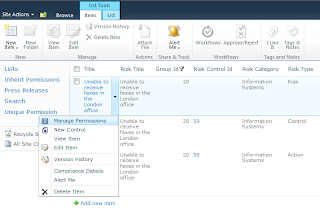
Remove the "Modify Permissions" action from the list item menu for lists that have a special content type (used in my solution). Since I need to implement a special application page for modifying list item permissions on the list my solution uses, I've added my own custom action for "Manage Permissions". I don't want to confuse users with two menu items for permissions, nor do I want them using the default "Modify Permissions" action, because it will break my solutions functionality.

While there are a number of ways to do this, most use jQuery and most wait for the ECB to be loaded before they remove the item. I don't particularly like this, because the user will typically see the "Modify Permissions" action for a brief moment before it's removed.

So I decided on a different approach that doesn't rely on jQuery. It uses JavaScript, CSS and leverages an object output by the List View Webpart, ctx, to hide the "Manage Permissions" action using CSS.

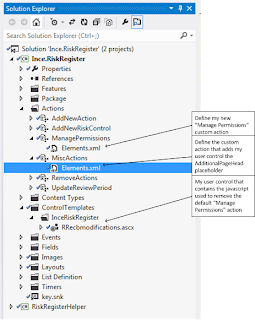
The solution elements:


Step 1: Create a user control, and define my JavaScript. The trick here is to limit the time wasted running the script on every page.

To ensure excessive processing isn't performed, the JavaScript will check to see if the ctx object has been defined (indicating the page has an instance of the List View Webpart on it).

If ctx has been defined, the script then checks the ctx.listTemplate property to see if the list instance is based on my solutions custom list template.

If the list template used is the one my solution has deployed, then it writes some CSS to the page to hide the "Manage Permissions" action on the ECB / LIM. The CSS output uses an attribute selector to hide list items with the attribute "sequence" set to 1160 (which is what "Manage Permissions" is set to; you can use Firefox and Firebug to find the sequence number for other controls).

All the user control contains is the following script:

<script type="text/javascript">
ExecuteOrDelayUntilScriptLoaded(editEcbMenusEx, 'Core.js');
function editEcbMenusEx() {
try {
if (typeof ctx == "undefined") {
return;
}
else {
if (ctx.listTemplate == 15501) {
var css = 'li[sequence="1160"]{display:none;}';
var head = document.getElementsByTagName('head')[0];
var style = document.createElement('style');
style.type = 'text/css';
if (style.styleSheet){ style.styleSheet.cssText = css; }
else { style.appendChild(document.createTextNode(css)); }
head.appendChild(style);
}
}
} catch (e) {
}
}
</script>


Step 2: Create a custom action (that gets deployed at the web level when my solution is activated) that loads my control into the AdditionalPageHead place holder of the webs master page.

<?xml version="1.0" encoding="utf-8"?>
<Elements xmlns="http://schemas.microsoft.com/sharepoint/">
  <Control Id="AdditionalPageHead" Sequence="150" 
  ControlSrc="~/_CONTROLTEMPLATES/inceriskregister/RRecbmodifications.ascx">
  </Control>
</Elements>


Step 3. Deploy the solution
[Note: The Manage Permissions action that you see on the LIM is the new custom action that I've defined, which opens my custom manage permissions application page in a modal dialog)