There are many reasons why you might choose to use the TinyMCE richtext editor over the Office365/SharePoint richtext editor. One of those reasons is if you're building a clientside app that needs a richtext editor, and you want the richtext controls to be inside the app, and not on the ribbon.
TinyMCE is a great richtext editor with good cross browser support. Among the functionality it has, it provides a way to integrate with a spell checking service.
In the example below I'm going to demonstrate how to integrate the SharePoint spellcheck.asmx webservice with the a TinyMCE richtext editor, in an AngularJS app, hosted in an Office365 or SharePoint site.
The files for this example can be downloaded from the MSDN TechNet Gallery, here: Technet Gallery. I suggest you download the files and look through the code to fully understand the example. To use the example, follow the instructions in the readme.txt file included in the zip file.
What I want to focus on here is how to call the webservice, and then how to interpret the results.
First, I'll start with a screenshot of what this looks like when it's running (the screen shots are from SharePoint 2013, but this works exactly the same with Office365):


The code to get this running looks like this (remember, the full source can be downloaded here: TechNet Gallery):
First, the app's html file. It's pretty simple, containing a few script references and a textarea.
<!-- There's not much to the HTML file. A div that references my AngularJS controller, and then a textarea with the data-ui-tinymce attribute. --><div id="ng-app" data-ng-app="app" data-ng-cloak > <div data-ng-controller="spellCheckExampleCtrl as vm" data-ng-cloak> <textarea data-ui-tinymce id="eBriefTiming" data-ng-model="vm.richTextContent"></textarea> </div></div><!-- Load the scripts --><!-- XML2JSON is used to transfor the XML based response from the Spellcheck webservice to JSON --><script type="text/ecmascript" src="../tinymce/xml2json.js"></script><!-- AngularJS, Sanitize, resource and tinymce --><script type="text/ecmascript" src="../tinymce/angular.js"></script><script type="text/ecmascript" src="../tinymce/angular-sanitize.js"></script><script type="text/ecmascript" src="../tinymce/angular-resource.js"></script><script type="text/ecmascript" src="../tinymce/tinymce/tinymce.min.js"></script><!-- My scripts. All of this scripts are used to create the app. --><script type="text/ecmascript" src="../tinymce/config.tinymce.js"></script><script type="text/ecmascript" src="../tinymce/app.js"></script><script type="text/ecmascript" src="../tinymce/controllers.js"></script><script type="text/ecmascript" src="../tinymce/services.js"></script>The app and controller code. Again, this is pretty simple; it's not really doing much in this simple app.
(function () { 'use strict'; var app = angular.module('app', [ 'ngSanitize', 'ngResource', 'ui.tinymce' ]); app.run();})();//App Controller(function () { 'use strict'; //define the controller var controllerId = 'spellCheckExampleCtrl'; angular.module('app').controller(controllerId, ['$scope', '$q', spellCheckExampleCtrl]); function spellCheckExampleCtrl($scope, $q) { var vm = this; vm.richTextContent = null; init(); function init() { }; }})();This next bit of code initialises the TinyMCE directive with AngularJS. The main point of interest in this code snippet is the spellchecker_callback function. Example the function, specifically how the results from the spelling webservice are interpreted.
(function () {//pass in the remoteServices factory. This factory contains the method for querying the SharePoint Spellcheck webserviceangular.module('ui.tinymce', []).value('uiTinymceConfig', {}).directive('uiTinymce', ['uiTinymceConfig', 'remoteServices', function (uiTinymceConfig, remoteServices) {uiTinymceConfig = uiTinymceConfig || {};var generatedIds = 0;return {require: 'ngModel',priority: 10,link: function (scope, elm, attrs, ngModel) {var expression, options, tinyInstance;var updateView = function () {ngModel.$setViewValue(elm.val());if (!scope.$root.$$phase) {scope.$apply();}};if (attrs.uiTinymce) {expression = scope.$eval(attrs.uiTinymce);} else {expression = {};}if (expression.setup) {var configSetup = expression.setup;delete expression.setup;}// generate an ID if not presentif (!attrs.id) {attrs.$set('id', 'uiTinymce' + generatedIds++);}options = {// Update model when calling setContent (such as from the source editor popup)setup: function (ed) {ed.on('init', function (args) {ngModel.$render();ngModel.$setPristine();});// Update model on button clicked.on('ExecCommand', function (e) {ed.save();updateView();});// Update model on keypressed.on('KeyUp', function (e) {ed.save();updateView();});// Update model on change, i.e. copy/pasted text, plugins altering contented.on('SetContent', function (e) {if (!e.initial && ngModel.$viewValue !== e.content) {ed.save();updateView();}});// Update model when an object has been resized (table, image)ed.on('ObjectResized', function (e) {ed.save();updateView();});if (configSetup) {configSetup(ed);}},mode: 'exact',elements: attrs.id,inline_styles: true,plugins: ["advlist autolink lists link charmap hr pagebreak","searchreplace wordcount visualblocks visualchars code fullscreen","insertdatetime nonbreaking table contextmenu","paste textcolor spellchecker"],//override the default spellchecker (which, OOTB, doesn't work with SharePoint). Instead we'll use SharePoints spellcheck webservice.//This method is documented here: http://www.tinymce.com/wiki.php/Configuration:spellchecker_callbackspellchecker_callback: function (method, text, success, failure) {if (method == "spellcheck") {//Call the checkSpelling method (this is a method we've defined in another file, documented in the next script block). //This method will query the SharePoint spellcheck webservice. The query contains the full text from the //TinyMCE richtext editor.//When the response comes back, we need to create an array of spelling errors and suggestionsremoteServices.checkSpelling(text).then(function (data) {var wordCollection = data;var suggestions = [];//***//Check for spelling errors//***//Get the array of flagged words that are errorsvar spellingErrors = null;if (data.spellingErrors.SpellingErrors && data.spellingErrors.SpellingErrors.flaggedWords !== 'undefined') { spellingErrors = data.spellingErrors.SpellingErrors.flaggedWords.FlaggedWord;}//Check if an array of items was returnedif (spellingErrors instanceof Array == true) { for (var wi = 0; wi < spellingErrors.length; wi++) { var w = spellingErrors[wi]; suggestions[w.word] = []; }}//Check if a single item was returnedelse if (spellingErrors && spellingErrors.word) { suggestions[spellingErrors.word] = [];}//***//Check for spelling suggestions//***//Get the array of flagged words with suggestionsvar spellingSuggestions = null;if (data.spellingSuggestions.SpellingSuggestions) { spellingSuggestions = data.spellingSuggestions.SpellingSuggestions;};//Check if an array of items was returnedif (spellingSuggestions instanceof Array == true) { for (var wi = 0; wi < spellingSuggestions.length; wi++) { var w = spellingSuggestions[wi]; //Check if there is a single spelling suggestion, or an array of suggestions. //Then add it to suggestions array for the current word suggestions[w.word] = (w.sug.string instanceof Array == true) ? w.sug.string : [w.sug.string]; }}//Check if a single item was returnedelse if (spellingSuggestions && spellingSuggestions.word) { //Check if there is a single spelling suggestion, or an array of suggestions. //Then add it to suggestions array for the current word suggestions[spellingSuggestions.word] = (spellingSuggestions.sug.string instanceof Array == true) ? spellingSuggestions.sug.string : [spellingSuggestions.sug.string];}//Return the list of suggestions to the success handler.success(suggestions);})["catch"](function (error) {//in my testing, failure doesn't seem to work. So I'm sending back Success with a null value.success(null);});}},toolbar: "styleselect | bold italic | bullist numlist outdent indent | link | spellchecker",fontsize_formats: "9pt 10pt 11pt 12pt 14pt 16pt 18pt 20pt 22pt 24pt",menubar: true,statusbar: false,height: 300,width: 620};angular.extend(options, uiTinymceConfig, expression);setTimeout(function () {tinymce.init(options);});ngModel.$render = function () {if (!tinyInstance) {tinyInstance = tinymce.get(attrs.id);}if (tinyInstance) {tinyInstance.setContent(ngModel.$viewValue || '');ngModel.$setPristine();}};scope.$on('$destroy', function () {if (!tinyInstance) { tinyInstance = tinymce.get(attrs.id); }if (tinyInstance) {tinyInstance.remove();tinyInstance = null;}});}};}]);})();Finally, the code for the remoteServices factory. This code is responsible for making the call to SharePoint's Spellchecker webservice.
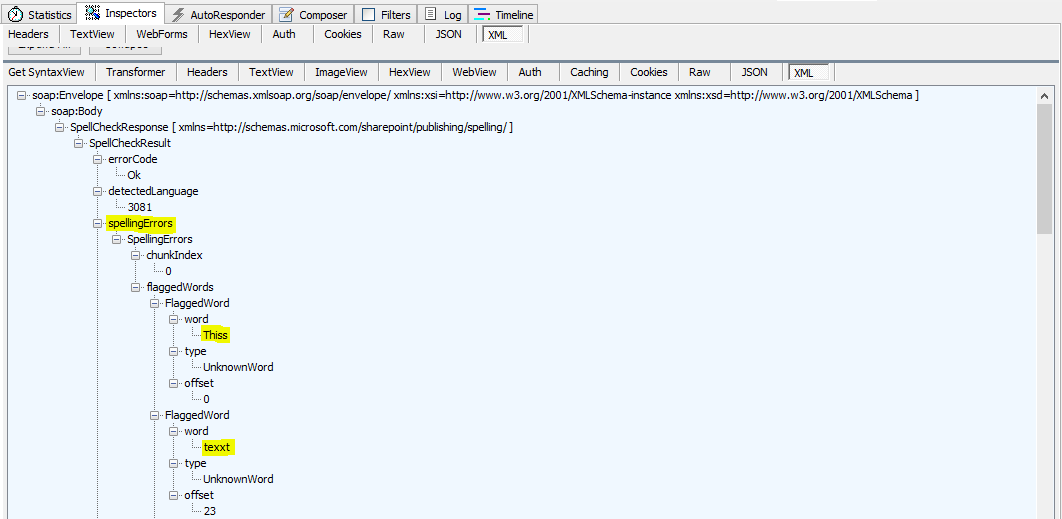
(function () {'use strict';var serviceId = 'remoteServices';angular.module('app').factory(serviceId, ['$resource','$q', remoteServices]);function remoteServices($resource, $q) { var service = this; init(); //service signature return { checkSpelling: checkSpelling }; function init() { } //This function returns a resource used to query //the spellcheck webservice. It contains the HTTP method, //headers and will transform the response from XML to JSON function getSpellCheckerResource() { return $resource('/_vti_bin/spellcheck.asmx', {}, { post: { method: 'POST', params: { 'op': 'SpellCheck' }, headers: { 'Content-Type': 'text/xml; charset=UTF-8' }, transformResponse: function (data) { // convert the response data to JSON // before returning it var x2js = new X2JS(); var json = x2js.xml_str2json(data); return json; } } }); } //This is the public function the TinyMCE editor will //call when the check spelling button is clicked. //The functions takes a block of text (or words) as input //and returns the spellcheck results function checkSpelling(words) { //Convert an array of words into a single string var wordstring = ""; for(var i = 0; i < words.length; i++) { wordstring += (words[i] + ' '); } //build the SOAP request var soapData = '<?xml version="1.0" encoding="utf-8"?><soap:Envelope xmlns:xsi="http://www.w3.org/2001/XMLSchema-instance" xmlns:xsd="http://www.w3.org/2001/XMLSchema" xmlns:soap="http://schemas.xmlsoap.org/soap/envelope/"><soap:Body><SpellCheck xmlns="http://schemas.microsoft.com/sharepoint/publishing/spelling/"><chunksToSpell><string>' + wordstring + '</string></chunksToSpell><declaredLanguage>3081</declaredLanguage><useLad>false</useLad></SpellCheck></soap:Body></soap:Envelope>' //Get the resource (defined in a function above) used to query the webservice var resource = getSpellCheckerResource(); var deferred = $q.defer(); //Post the data (the string of words) to the webservice //and wait for a response! resource.post(soapData, function (data) { //successful callback deferred.resolve(data.Envelope.Body.SpellCheckResponse.SpellCheckResult); }, function (error) { //error callback var message = 'Failed to queried the SharePoint SpellCheck webservice. Error: ' + error.message; deferred.reject(message); }); return deferred.promise; }}})();The screenshots below (taken from Fiddler and Chrome) show the request being sent and the data that is received back.
Request.

Response (showing the errors).
Response (showing the suggestions).

You can inspect the array of spelling suggestions and errors received back from the webservice by putting a break in the code.


Hpapy Spallnig!
References:
